
Family members who have taken the steps to be in a resident's private address book for their secure Echo Show device can place either a video or a voice call to the resident's apartment or home.
If you are a family member who has not yet been set up to be included in the private address book for the resident you wish to contact, please contact the resident's community. They must provide us with your full name, email, mobile phone, and the resident's name in order for you to be approved.
Once you have received an email from Serenity stating that you are now set up in the resident's private, secure address book, you may call that resident via video or voice.
Here's how:
- On your mobile device, open your Alexa app (sign in if you aren't already signed in)
- You have two choices:
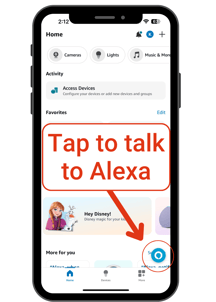
Tap the "Alexa" icon in lower right corner and say
"Alexa, call ______ (resident's name as you have it listed in your Alexa app contacts)."
Or 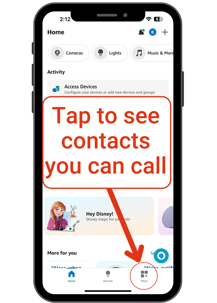
- Tap the More icon in the lower right corner
- Select Communicate in upper right
- Tap Call in upper left
- Select the resident's name in the list of contacts
NOTE: The resident's name must have a blue checkmark to the right of it. If you don't see the blue checkmark, you are not yet set up to call that resident's device. Please contact support@serenityconnect.com to resolve the issue.
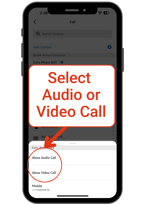
Once you ask or select the resident's contact, select whether you'd like to make an Alexa Audio Call or an Alexa Video Call.
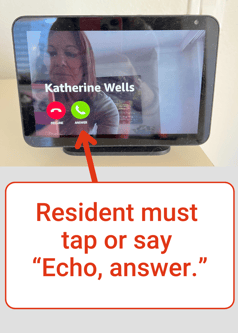
The resident's device will ring and display who is calling. The resident must then say, "Echo, answer." or tap the green "answer" button on their Echo Show device.